
Why Officials Need More Than a PDF Schedule on Their Phone
A PDF can show when and where to work, but it rarely gives officials the assignment details, crew contacts, league context, expense steps, and game history they need to arrive prepared. Here’s what belongs in a mobile workflow instead.
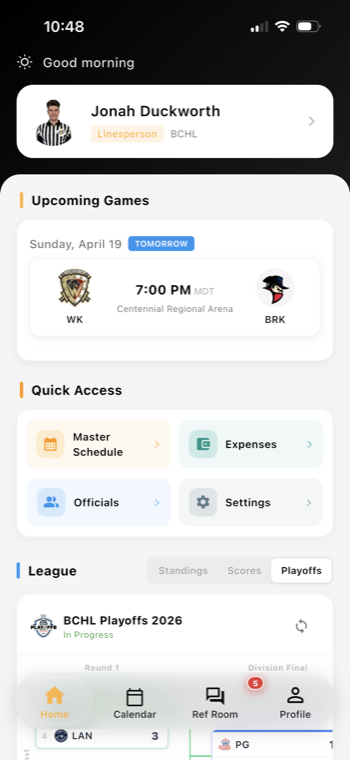
A schedule tells officials where to go, but not always how to prepare
A PDF schedule on a phone is useful for one thing: confirming the date, time, and location of a game. But for many officials, that is only the starting point. When they are moving between rinks, fields, or gyms, they also need the context that helps them show up ready to work.
That context usually includes the assignment details, crew contacts, league or division notes, and any game-specific expectations that affect how the crew should operate. If that information lives in separate emails, text threads, and spreadsheets, officials spend too much time searching and too little time preparing.
That is why modern referee assignment software and a mobile referee app workflow matter. They put the assignment in one place and keep the supporting details close to the game itself.
What officials should be able to see before they leave home
A good mobile workflow should do more than display a schedule entry. It should make the full assignment easier to understand at a glance.
At minimum, officials benefit from seeing:
- Assignment details: date, start time, venue, division, and role
- Crew contacts: partner names, phone numbers, and who is working which position
- League context: age group, competition level, special rules, or season phase
- Game history: prior meetings, recent incidents, or notes that affect preparation
- Expense information: travel rules, mileage expectations, or reimbursement steps
This does not replace an assignor’s judgment. It simply reduces the chance that important information gets lost between scheduling and game day.
For officials learning new levels or moving into more demanding assignments, that visibility supports development too. A mobile app can help them review what kind of game they are walking into, who they are working with, and what happened the last time this matchup or venue appeared on the schedule. For a deeper look at the official side of the workflow, see Ref Buddy for referees.
Why crew communication and game history should travel with the assignment
Game day changes happen. A partner is replaced. A rink note changes. A league reminder gets added after the schedule was posted. If officials are relying on a static PDF, they may never see those updates until they are already on site.
That creates avoidable problems:
- An official arrives without the right contact number for a replacement crew member
- The crew misses a location note about dressing room access or check-in timing
- A newer official does not see the division context that helps set expectations
- A supervisor or assignor has to repeat information that should have been visible before departure
When the assignment, communication, and history are connected, the official can review everything once and move on. That is especially helpful in multi-sport organizations, youth leagues, and minor hockey associations where officials may work several venues in one weekend.
Assignors also benefit because they spend less time fielding basic questions and more time handling exceptions. Tools like the Assignor Dashboard can help keep those assignment details organized in a way that is easier to share and update.
Expenses and reports are part of preparation, not an afterthought
Officials do not just need to know where to be. They also need to know what happens after the game.
If mileage, parking, or other expenses are handled differently by division, venue, or league, the workflow should make that visible before the crew arrives. Otherwise, officials may wait until later to figure out how to submit a claim or whether a receipt is needed.
The same is true for game reports. When a report is expected, the crew should know:
- Whether a report is required for the assignment
- What type of incident or note should be documented
- Where the submission goes after the game
- Whether follow-up status will be visible to the assignor or league staff
This is where sports officiating software can improve daily operations without adding extra admin work. When expense tracking and game report software sit closer to the assignment, officials can complete follow-up work while the details are still fresh.
A practical checklist for assignors and officials
If your current workflow still depends on a PDF schedule, start by asking whether officials can answer these questions before they leave home:
- Who am I working with?
- What level of game am I walking into?
- Are there any venue or league notes I need to know?
- What expense steps apply to this assignment?
- Is there a report or follow-up expected after the game?
If the answer is unclear, the schedule may be complete but the preparation is not.
The goal is not to overload officials with more information. It is to give them the right information in the same place they already check for assignments, communication, and updates. That is what makes official availability tracking, referee scheduling app workflows, and league referee management feel practical instead of fragmented.
Want cleaner referee operations?
Ref Buddy connects schedules, officials, crew communication, expenses, and reports so leagues can spend less time chasing details.
Schedule a Demo